
The Forecast Editor is the primary workspace where planners review historical demand, analyze future forecasts, make forecast adjustments, and manage planning activities within SAFIO.
Screen Overview #
By Single SKU #
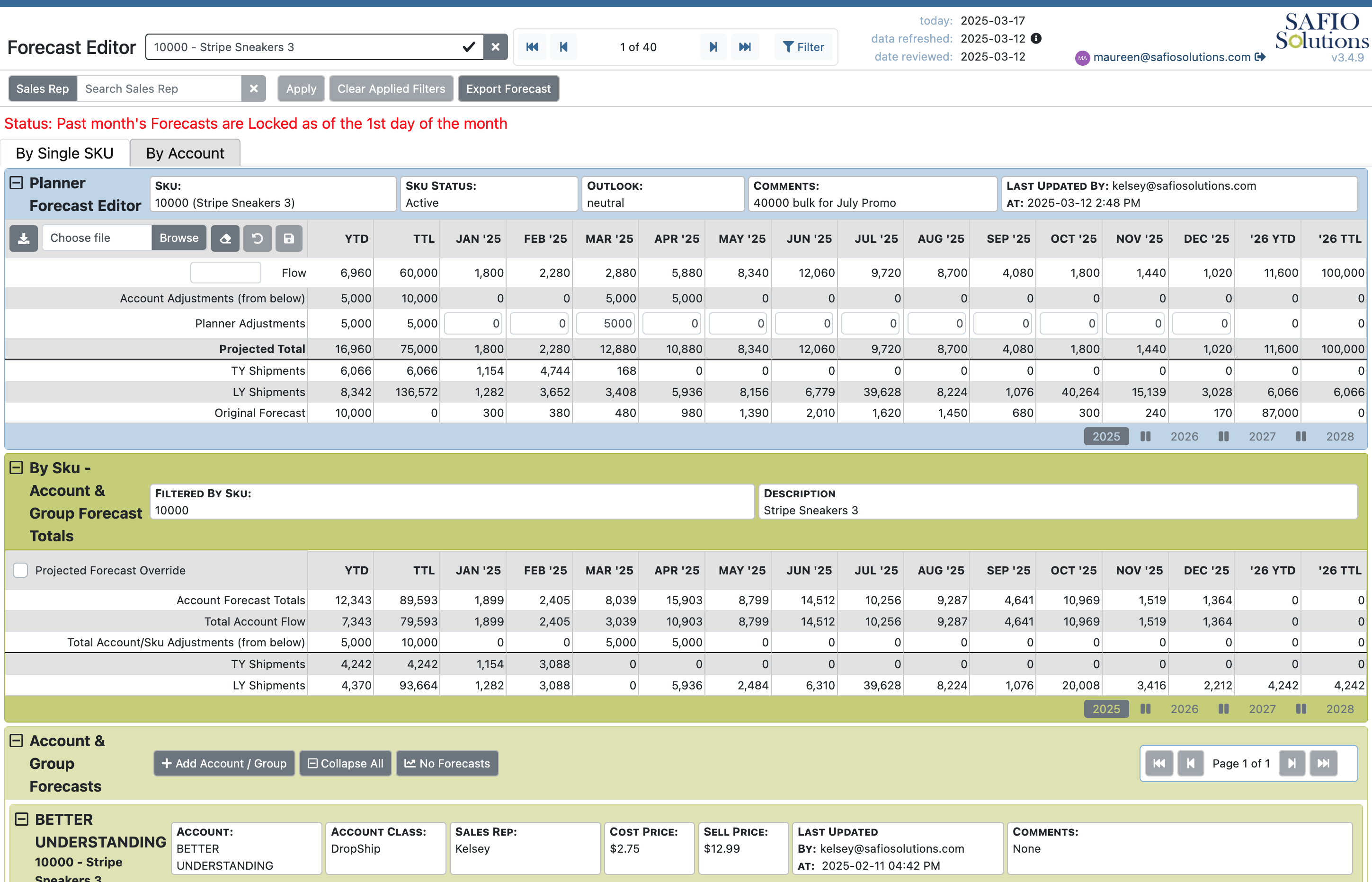
The By Single SKU view displays the forecast for an individual product across the planning horizon. This view is ideal for analyzing demand trends, reviewing forecast history, and making detailed adjustments for a specific SKU.
By Account #
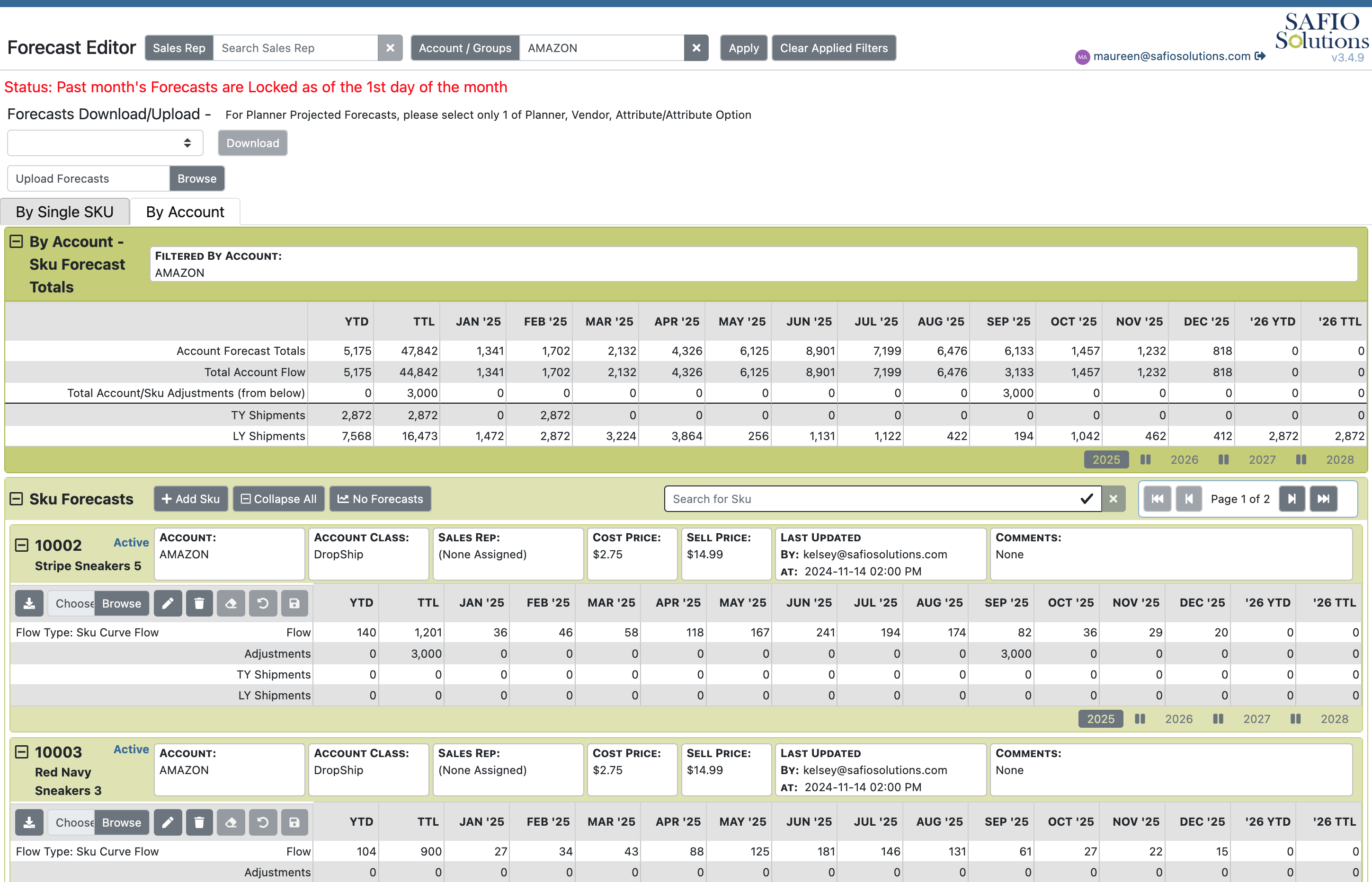
The By Account view displays forecasts by customer or account, allowing planners to evaluate demand from a customer perspective. This view is commonly used when reviewing customer-specific forecasts, promotions, or account-level planning activities.
Purpose #
Use the Forecast Editor to:
- Review historical demand and future forecast values.
- Analyze demand trends across planning periods.
- Enter or adjust forecast quantities.
- Review forecasts by SKU or customer account.
- Support monthly forecasting and planning activities.
- Prepare forecasts for approval and publication.
The Forecast Editor serves as the central workspace for day-to-day forecasting activities within SAFIO.
How Do I Get Here? #
Navigate to:
Planning → Forecast Editor
Screen Elements #
| Element | Description |
|---|---|
| Forecast Grid | Displays forecast values for each planning period. |
| Historical Demand | Displays historical sales data used to support forecasting decisions. |
| Product Information | Displays identifying information for the selected SKU. |
| Account Information | Displays the selected customer or account when using the By Account view. |
| Time Period Columns | Organize forecast values by week or month, depending on system configuration. |
| Filters | Limit the displayed data to specific products, accounts, planners, or other criteria. |
| Navigation Controls | Move between products, accounts, or planning periods. |
| Status Indicators | Display planning status, lock status, or other forecast information where applicable. |
Available Actions #
| Button / Action | Description |
|---|---|
| Edit Forecast | Modify forecast quantities for one or more planning periods. |
| Save | Save forecast changes to SAFIO. |
| Copy Forecast | Copy forecast values between planning periods or forecasts (if enabled). |
| Bulk Export | Export forecast data for offline review or editing. |
| Bulk Import | Import forecast updates from a supported file format. |
| Apply Filters | Display only the products, accounts, or planning data matching the selected criteria. |
| Switch View | Toggle between the By Single SKU and By Account views. |
Tips & Best Practices #
- Review historical demand before making forecast adjustments.
- Apply filters to focus on the products or accounts requiring attention.
- Save changes frequently during extended planning sessions.
- Verify significant forecast changes before publishing or locking forecasts.
- Use the By Single SKU view for detailed product analysis and the By Account view when reviewing customer-specific demand.
- Export forecasts before making large-scale changes when appropriate.